Configure Per-App VPN
Deploy Apple's com.apple.vpn.managed.applayer payload with ProviderType=packet-tunnel so Apple selects traffic from assigned applications and Vylos carries that traffic through WireGuard.
Provider scope
Vylos supports AppLayerVPN through its WireGuard packet-tunnel provider. It does not include an App Proxy, IPsec, or IKEv2 provider.
A profile that selects ProviderType=app-proxy requires a different VPN implementation and is unsupported by Vylos.
Deployment Steps
- Build an AppLayerVPN packet-tunnel profile from Deploy with
.mobileconfigProfiles. - Give the profile a unique
VPNUUIDand enableOnDemandMatchAppEnabledwhen assigned-app traffic should start it automatically. - Deliver the VPN profile through MDM or install it directly for testing.
- Use MDM to install each target app as managed and assign the same
VPNUUIDto it. - Open Vylos and confirm that the managed tunnel reports Per-App plus the expected application identifiers.
- Open an assigned app and verify that its traffic uses WireGuard while an unassigned app remains outside the tunnel.
Direct profile installation can create the VPN entry, but only MDM can create production app assignments.
How Responsibilities Are Divided
- The configuration profile installs the AppLayerVPN tunnel, either through MDM or direct
.mobileconfiginstallation. - MDM assigns the profile's
VPNUUIDto managed applications and replaces or removes those assignments. Direct profile installation alone cannot create production app-to-VPN mappings. - Apple's operating system creates the source-application rules, evaluates application and domain matches, starts the tunnel on demand, and sends only matching traffic to the provider.
- Vylos presents the profile-owned VPN as a read-only managed tunnel and carries its traffic through WireGuard.
- The WireGuard server sees ordinary WireGuard packets. It does not need an AppLayerVPN-specific server implementation.
The operating system applies the app assignment before matching traffic reaches Vylos. This routing choice is automatic, and the WireGuard server configuration stays the same as it would for a device-wide tunnel.
Vylos does not create, edit, or remove production application mappings. It also keeps AppLayerVPN tunnels out of Siri Shortcuts because their lifecycle belongs to MDM and Apple Settings.
What Vylos Shows
Every tunnel detail screen includes a read-only App Routing section:
- An AppLayerVPN tunnel shows Per-App and lists the signing identifiers Apple reports for its MDM-assigned applications. When a rule contains destination filters, Vylos also lists its match domains; identifiers such as
com.example.corporate-appmay appear verbatim because Apple does not expose every app's display name. - A conventional destination-IP packet tunnel shows Device-wide and All Apps. This means eligible device traffic follows that tunnel's routes; it does not mean Vylos has inspected or enumerated every running application.
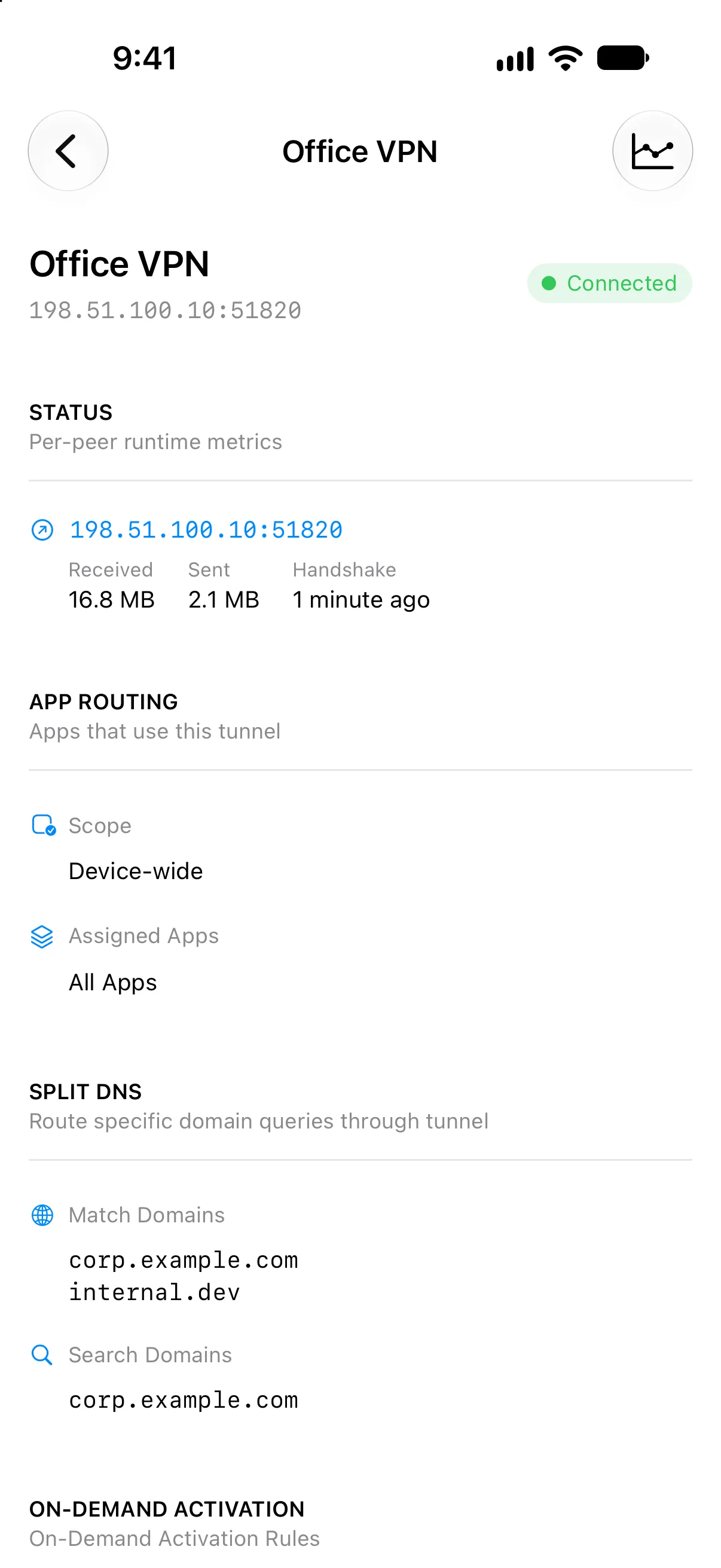
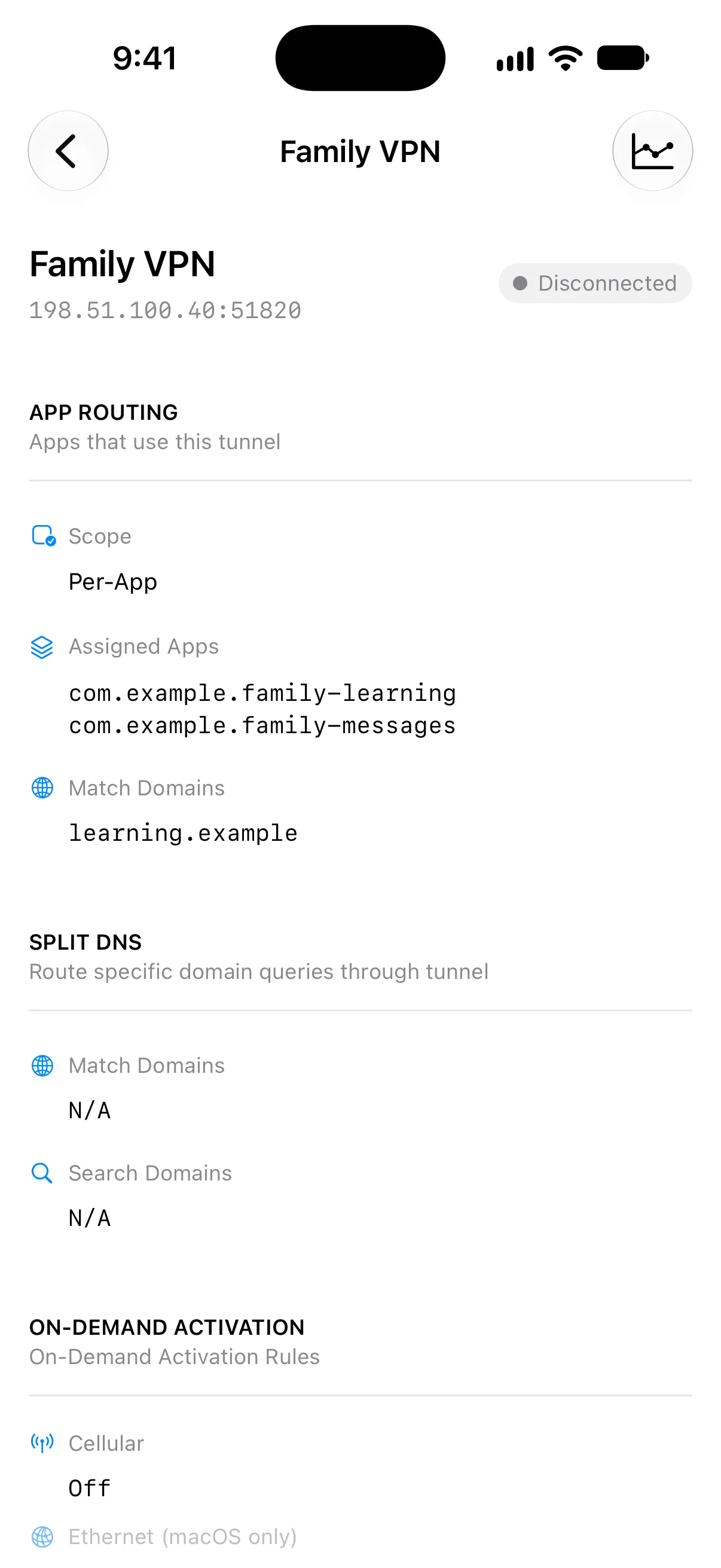
Apple's packet-tunnel API does not expose a reliable per-process list for a device-wide VPN. Vylos therefore cannot show which individual applications are currently consuming an ordinary VPN, and it does not infer such a list from traffic counters.
Supported Packet-Tunnel Capabilities
The following AppLayerVPN capabilities apply to the Vylos packet-tunnel path:
VPNUUIDassociations for MDM-managed applications.OnDemandMatchAppEnabledautomatic activation when an assigned app starts network communication.- Source-application routing supplied by Apple's operating system.
AssociatedDomains,ExcludedDomains, andSafariDomains, subject to Apple's platform and domain-association requirements.SMBDomainsand service-specific domain fields on the Apple platforms where Apple makes them available.- Disconnect On-Demand rules that tell the operating system when matching applications should bypass the tunnel.
- Read-only Vylos status, current WireGuard handshake, traffic counters, bandwidth history, logs, and notification naming for the resulting managed tunnel.
- Read-only application signing identifiers and match domains reported by the operating system.
Apple evaluates the application and domain rules before packets reach Vylos. These profile fields therefore remain MDM-owned and do not appear as editable Vylos on-demand rules.
Create the VPN Profile
Build the AppLayerVPN payload from the .mobileconfig Profiles reference. That page is the canonical source for Vylos provider identifiers, VPNUUID, WireGuard configuration transport, and the complete profile example.
Set OnDemandMatchAppEnabled to true when traffic from an assigned app should start the tunnel automatically.
OnDemandMatchAppEnabled guarantees automatic activation; it does not guarantee that iOS immediately tears the tunnel down when the assigned app closes. The system may keep the tunnel connected for reuse, but the app rules continue to scope which applications can send traffic through it.
A matching disconnect On-Demand rule controls bypass behavior for its network conditions.
Assign Applications
iOS, iPadOS, and visionOS
Install each target application as a managed app and assign it the same VPNUUID used by the AppLayerVPN payload. The operating system creates one application rule for each matching managed-app assignment.
Safari is a special case: Apple uses SafariDomains to select the sites that use the tunnel. A general mapping cannot send every Apple system app through a per-app VPN.
Replace or Remove an Assignment
On iOS, iPadOS, and visionOS, the app-to-VPN relationship is a managed-application attribute separate from the AppLayerVPN configuration profile. Replacing or removing the VPN profile alone therefore does not clear an application's existing VPNUUID relationship.
When an assignment changes, the MDM service must update the target application's ApplicationAttributes so the old VPNUUID is no longer present. If the MDM console shows the assignment as removed but Vylos still lists the application, resend or update that managed application's installation or configuration assignment.
Some MDM products label this action Reinstall, Update, or Resend installation command. Do not remove the VPN profile merely to hide a stale application rule.
Vylos displays the rules that the operating system currently reports. No Apps Assigned appears only after Apple removes the managed app attribute and its resulting application rule.
An administrator can use Apple's ManagedApplicationAttributes query, when exposed by the MDM service, to confirm whether the device still reports a VPNUUID for the application.
macOS
Deploy a com.apple.vpn.managed.appmapping payload alongside the AppLayerVPN payload. Each mapping provides the target application's bundle identifier, signing identifier, designated requirement, and matching VPNUUID.
Use the optional MatchTools array when only selected helper tools launched by an application should use the VPN. For example, an administrator can map a signed command-line tool launched from Terminal without mapping every Terminal connection.
Unsupported Provider Types
Vylos does not support ProviderType=app-proxy, which requires a separate flow-forwarding provider and server. Vylos carries WireGuard IP packets through ProviderType=packet-tunnel instead.
Vylos also does not provide Apple's built-in IPsec or IKEv2 implementations. Profiles for those protocols use the operating system's built-in VPN providers rather than the Vylos extension.
For Apple's platform rules and payload fields, see the AppLayerVPN payload reference, application mapping payload, ApplicationAttributes settings reference, ManagedApplicationAttributes query, and VPN traffic routing guide.